14th August 2006

Pixelpost 1.5 with Lightbox JS v2.0

posted in reviews |

Well, I have been using pixelpost now for quite some time and liked it a lot. A few day ago i came across Lightbox JS v2.0 and wondered why I haven’t seen it before on any websites. So I wanted to combine both for the “Browse View” of my pixelpost.
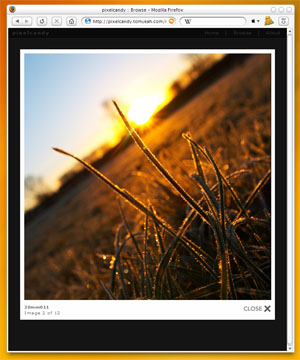
 pixelpost with lightbox in firefox screenshot

Before i continue with the install instructions you should have a look at it. Example Ok now what to do: At first I am assuming that you have Pixelpost 1.5 already installed. Now get Lightbox JS v2.0 and copy the folders “css” and “js” just aside your “index.php” from pixelpost and copy the stuff from the “image” folder into the existing “image” folder from pixelpost.
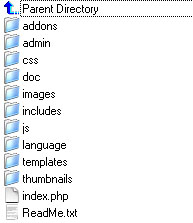
 pixelpost directory structure with lightbox included

 Should look like this in the end. Open pixelpost’s “index.php” and go to the line with the “$thumb_output” (line 723 for me) and replace it with:

$thumb_output .= "<a href='images/$name' rel='lightbox[views]' title='$title'><img src='$thumbnail' alt='$title' title='$title' class='thumbnails' /></a>";

Next go to your “browse_template.html” of the recent pixelpost template and insert:

<link rel="stylesheet" xhref="css/lightbox.css" type="text/css" media="screen" /> <script xsrc="js/prototype.js" type="text/javascript"></script> <script xsrc="js/scriptaculous.js?load=effects" type="text/javascript"></script> <script xsrc="js/lightbox.js" type="text/javascript"></script>

Just put it under the existing “<link rel=”alternate stylesheet” …”.Sometimes you have to modify “lightbox.css” because of font colors of your pixelpost theme. Like in my case i had to edit this:

#imageDataContainer{ color: #666; …

In order to get a little link to the picture beside the caption i did the following edit in the “lightbox.js” . Look for the line with

Element.show('caption');

and replace the next line with

Element.setInnerHTML( 'caption', imageArray[activeImage][1] + " <a target=_blank xhref=" + imageArray[activeImage][0] + ">[ link ]</a> ");

It worked for me.

This entry was posted on Monday, August 14th, 2006 at 2:12 pm and is filed under reviews. You can follow any responses to this entry through the RSS 2.0 feed. You can leave a response, or trackback from your own site.

There are currently 12 responses to “Pixelpost 1.5 with Lightbox JS v2.0”

Why not let us know what you think by adding your own comment! Your opinion is as valid as anyone elses, so come on... let us know what you think.

  1. 1 On September 24th, 2006, Sidney said: [Quote]

    hi,
    I just can’t get your lightbox working on pixelpost…
    when I load my site, it indicates an error…
    (Parse error: parse error, unexpected T_STRING in….path….index.php, line 723)
    Might there be a mistake in the code you’ve indicated on your site?

    Thanks for your reply,

    Sidney

  2. 2 On September 25th, 2006, Sidney said: [Quote]

    Hallo,
    ich kriege den script einfach nicht zum Laufen….
    der parser fehler wurde behoben.
    ich habe eine frische pixelpost version 1.5 auf meinen server gespielt.
    die script-änderung für browser_template.html, ist das die file im ‘templates/simple’ folder?
    ich bin leider kein php kenner und würde mich freuen eine lösung zum problem zu finden,
    danke, sidney

  3. 3 On September 25th, 2006, Chris said: [Quote]

    This tutorial worked great! Thank you very much!

  4. 4 On September 25th, 2006, Chris said: [Quote]

    Sidney, I don’t speak a lick of German, but from what I can make out…the location of the browse_template.html is in the templates area of pixelpost on your server. If you are using the Simple template, then it would be in ../templates/simple. If you are using a different template, it would be in that templates sub-folder of the templates directory.

    Hope that helps and doesn’t cause further confusion.

  5. 5 On December 2nd, 2006, Marius said: [Quote]

    Hi, I was wondering if you’re using this Lightbox v2.0 also for navigating in your image_template. (mouse over previous/ next image)
    I’ve been searching for a tutorial how to implement this but can’t find how to do this.

    An other question, would it be able to use mouseover navigation like on your image_template and the zoom function like on your browse_template at the same time?
    E.g. Mouse left of picture is previous, mous middle of picture is zoom, mouse right of picture is next?

    A lot of questions, but I would be glad of you could answer my first one.

  6. 6 On March 10th, 2007, Cecily said: [Quote]

    Hi,

    I tried this but my images open in a blank window, not in the lightbox. I copied the code and the instructions and followed them to the letter. Do you know why this might be happening?

    Thanks!

  7. 7 On March 14th, 2007, Administrator said: [Quote]

    Cecily on March 10, 2007 at 3:11 pm said:

    Hi,

    I tried this but my images open in a blank window, not in the lightbox. I copied the code and the instructions and followed them to the letter. Do you know why this might be happening?

    Thanks!

    sometimes the .js script takes a while to load. or you placed em in the wrong folder.

  8. 8 On July 10th, 2007, tredinertok said: [Quote]

    Hello

    Very interesting information! Thanks!

    G’night

  9. 9 On October 28th, 2007, krembo99 said: [Quote]

    Hi…
    I was also wondering why Lightbox was never implemented (even as a plugin) in Pixelpost.
    Thanks for the info.
    Maybe you would consider publishing it on the offical Pixelpost web like an extention, so many more people will know it exist :-)

  10. 10 On December 7th, 2007, daDD said: [Quote]

    hi,
    could you tell me where i can download pixelcandy template ?

    regards.

  11. 11 On October 8th, 2008, Christian said: [Quote]

    Hey! Thanks for this great tutorial!
    But I’ve one problem/question. It seems to me as if you use the mosaic-addon for pixelpost, is that correct?
    I’m using it too, but i’m not able to configure it the right way, because if i delete the showimage.php?=pieces[0] code with images/$names no image is shown, but a blank page opens.
    In the footer of the browser only myurl/images/ is displayed and not as it should be myurl/images/imagename.jpg

    Can you help me?

    Greetz,

    Christian

  12. 12 On December 18th, 2008, Petre Gospodinov said: [Quote]

    Christian on October 8, 2008 at 12:34 am said:

    Hey! Thanks for this great tutorial!
    But I’ve one problem/question. It seems to me as if you use the mosaic-addon for pixelpost, is that correct?
    I’m using it too, but i’m not able to configure it the right way, because if i delete the showimage.php?=pieces[0] code with images/$names no image is shown, but a blank page opens.
    In the footer of the browser only myurl/images/ is displayed and not as it should be myurl/images/imagename.jpg

    Can you help me?

    Greetz,

    Christian

    If you use Pixelpost 1.7:
    1. You’ll find “$thumb_output” in “functions_browse.php”
    2. In “browser_template.html”, you have to post this code: . The difference is that the original code have “xref” and “xsrc” instead of “ref” and “src”.

    I didn’t found the “Element.show(’caption’);” in “lightbox.js” bur it works great for me.

    Thanks for this tutorial.

Leave a Reply