HowTo disable spellchecking in SRWare Iron (Chromium) for OS X
If you like Chrome and use Snow Leopard it is quite hard to surf without sending all kinds of statistics to google. In Windows there has always been a proper alternative named Iron. Lately I found this blog post, telling that they have a stable version for MacOS now.
You can install the same extensions as you would install in Chrome like Adblock. To disable spellchecking permanently you have to modify the~/Library/Application Support/Chromium/Default/Preferences
Just add the following lines in the end of the file (but before the last closing parenthesis):,
"spellcheck": {
"dictionary": "no-NB"
}
Just don’t forget the comma in the beginning. You can’t enter empty strings anymore and for future compatibility you should enter something valid, like the Norwegian accent "no-NB". As long as they don’t create a dictionary for this language it will work.
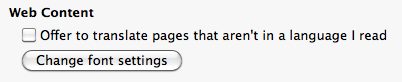
Another thing is to disable the translation bar since it is pretty annoying. Luckily you can do this via Iron’s preferences "Under the Hood".
Worked for me. And by the way … If you are annoyed by the mouse gesture extensions, especially on the 404 pages, just get xGestures. Yes it still works in Snow Leopard and it’s worth every penny since you can define mouse gestures for all your Apps throughout the whole system.