22nd May 2007

HowTo convert bin/cue to iso in Mac OS X

posted in mac os x |

Since Parallels doesn’t like .bin/.cue images, i had to convert it into an .iso image. A few guides pointed out that simple renaming of the files might be enough, but that didn’t work at all. So i was searching for free-ware solutions and couldn’t find anything. Toast Titanium was the last chance.

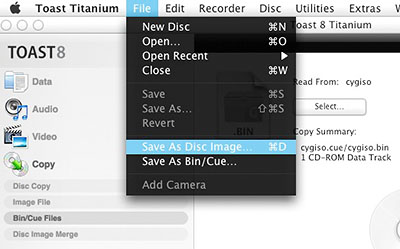
You simply right click on the .bin file and open it with Toast. Next you click “Save As Disc Image”.
Finally you just rename the file extension from the default .toast to .iso.
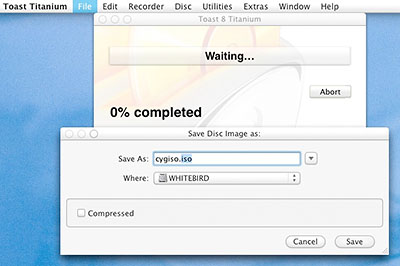
After a minute Toast was ready and i was able to boot from the .iso image in Parallels. Worked for me.

This entry was posted on Tuesday, May 22nd, 2007 at 10:46 pm and is filed under mac os x. You can follow any responses to this entry through the RSS 2.0 feed. You can leave a response, or trackback from your own site.

There are currently 7 responses to “HowTo convert bin/cue to iso in Mac OS X”

Why not let us know what you think by adding your own comment! Your opinion is as valid as anyone elses, so come on... let us know what you think.

  1. 1 On April 11th, 2008, Max said: [Quote]

    Your post is the top result on Google for this problem!

    I’ve found a freeware solution, using the open source software “binchunker”. It is available on Macports. Use the terminal to run these commands:

    sudo port install bchunk
    bchunk IMAGE.bin IMAGE.cue OUTPUTIMAGE.iso

    Quick and easy!

  2. 2 On May 7th, 2008, Mike said: [Quote]

    Awesome, binchunker worked well. Remember people, you have to install macports first, but since I had it already installed, this took me 30 seconds max

  3. 3 On July 10th, 2008, Angry and Confused said: [Quote]

    Anything Not INTEL Required?

  4. 4 On August 8th, 2008, prelude said: [Quote]

    bchunck should work on ppc as well. Macports will take care of the compile shit for you so… ;) Just give it a go.

  5. 5 On August 26th, 2008, Vincent said: [Quote]

    Thanks for showing an easy way to convert those bin files to Iso. In fact, I had to follow EXACTLY the procedure explained. If I dragged the bin or cue to the toast screen, it didn’t work. As well, I did not need to rename to iso. Toast mounted the image as a Cd that I could read perfectly.
    Thank you very much.
    PS. I tried Bchunker FE, an GUI version of Bchunker with ZERO succes …. I could not make it work.

  6. 6 On December 18th, 2008, marie said: [Quote]

    Oh joy! that command line crap (ie. bcchunk and the like) didn’t work for me…..so this is awesome. I also hear that you can convert .bin files in VLC using the streaming/export wizard. don’t know which is easier, but i will def. give your method a shot! thanks for posting this!

  7. 7 On January 6th, 2009, Laura said: [Quote]

    What Mac theme is used in this screenshot?

Leave a Reply