1st December 2005

DScalerScheduler Final VCR Control for TVBrowser

posted in windows |

I just finalized my DScalerScheduler Project. Instead of using different modules as before there are now only 2 applications.
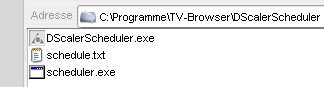
DScalerScheduler-final-install-path

Just put the DScalerScheduler-folder into your TvBrowser-folder like on the picture above. In TvBrowser just set the scheduler.exe for your Capture-Plugin. Than set these parameters for recording.

{start_day} {start_month} {start_hour} {start_minute} {end_day} {end_month} {end_hour} {end_minute} {channel_name_external_quiet}

Set up the external channel assignments according to your channel layout in DScaler and thats it. The DScalerScheduler looks like this. I’ve added some extra buttons in order to test the initial functions with DScaler, so you wont have to wait for the first record to see if it works at all. And as before you can minimize the application to tray by double-clicking on the tray-icon.
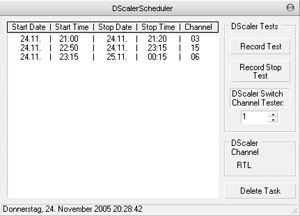
DScalerScheduler-final

You can download the DScalerScheduler here: download

It works with the new DScaler 4.1.14 and .Net Framework 1.1 .

Comments and reports are welcome.


Update:

I tried DScaler 4.1.15 and there is a new limitation.
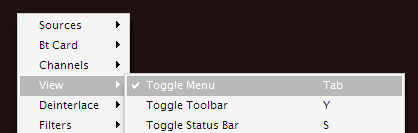
Dscaler scheduler toggle menu

Somehow things changed in 4.1.15. Don’t ask me why and how. But now you have to Toggle Menu to visible.

Its not possible to pass any other keys than [0–9] to DScaler with WM_CHAR. So I can’t implement the new key combos Shift+R and Shift+S.

Just for the info: DScaler is not meant to be a recording program for TV shows. Thats what they told me in their forums, so there won’t be any further support from them. So we have to deal with the problems and limitations.

Well, and about that remote launch of DScaler.exe … I don’t like it myself when apps start out of nowhere while playing games or watching dvds and so on, same with hibernate and shutdown. There are endless tools around the internet to do that functions and lots of people use em everyday (Shutdown Timer v1.0.3, Shutdown4U 3.6, and so on).

This entry was posted on Thursday, December 1st, 2005 at 2:20 am and is filed under windows. You can follow any responses to this entry through the RSS 2.0 feed. You can leave a response, or trackback from your own site.

There are currently 11 responses to “DScalerScheduler Final VCR Control for TVBrowser”

Why not let us know what you think by adding your own comment! Your opinion is as valid as anyone elses, so come on... let us know what you think.

  1. 1 On April 10th, 2006, Martin Olbrich said: [Quote]

    Welche Parameter muß ich für die Löschfunktion im TVBrowser Plugin angeben?

  2. 2 On July 24th, 2006, tim said: [Quote]

    scheint mit 4.1.15 nicht zu funktionieren (record test bewirkt nichts)

  3. 3 On July 28th, 2006, Jaume said: [Quote]

    Is there any plan to program a GUI to control this ’schedule.txt’: task manager with editing functions?

    A good approx would be add jobs to built-in windows Task Manager with wake-up and hibernate functions enabled, and DScaler/DScaler Scheduler running-processes check (to ensure schedule to run properly)

    Thanks.

  4. 4 On July 29th, 2006, tomyeah said: [Quote]

    Jaume on July 28, 2006 at 9:30 am said:

    Is there any plan to program a GUI to control this ’schedule.txt’: task manager with editing functions?

    A good approx would be add jobs to built-in windows Task Manager with wake-up and hibernate functions enabled, and DScaler/DScaler Scheduler running-processes check (to ensure schedule to run properly)

    Thanks.

    Jaune the Windows Tasks were too buggy for me in practice. I may add a few options from wizmo ( http://www.grc.com/wizmo/wizmo.htm ) for shutdown and hibernate but usually my recording machine runs 24/7 so I don’t need that functions myself.

    Regards, Tom.

  5. 5 On November 22nd, 2006, LouCypher said: [Quote]

    “Its not possible to pass any other keys than [0–9] to DScaler with WM_CHAR. So I can’t implement the new key combos Shift+R and Shift+S.”

    So use SendMessage/PostMessage instead. Every menu option has a corresponding message that can be sent from an external program. It’s how I use uICE or Girder to control the display of the program guide information. The beauty of it is that it doesn’t require giving focus to DScaler.

  6. 6 On November 27th, 2006, Ralf said: [Quote]

    Hey,

    the prog works perfect with my Hauppauge Nova DVB-S and DScaler. The quality is perfect, but how is it possible to use the s-vhs external device in the scheduler ? This channel of the cx card is not in the list - strg-alt-f3

    thx in advance
    Ralf

  7. 7 On November 29th, 2006, fresco said: [Quote]

    indeed as said a GUI with button ADD timer, would be no beauty but just neccesary, i myself am also a user that don’t bother for hybernation or whatever Run my Pc also 24/7 (for downloading UFC/other stuff)

  8. 8 On December 28th, 2006, Mike said: [Quote]

    i have problems whith original card software,watever i try this one…
    Thanks!

  9. 9 On January 23rd, 2007, Steven said: [Quote]

    It does work, however, the *.avi files produced on my system
    are enormous (about 50G for about 2hr.) Any suggestions?

  10. 10 On January 24th, 2007, Administrator said: [Quote]

    Steven on January 23, 2007 at 10:59 pm said:

    It does work, however, the *.avi files produced on my system
    are enormous (about 50G for about 2hr.) Any suggestions?

    thats a “bad” setting in dscalers record settings … you may try some on the fly encoding with xvid codecs …

  11. 11 On April 26th, 2008, bugsy said: [Quote]

    Thanks thanks thanks thanks thanks thanks thanks thanks thanks thanks thanks thanks thanks!

Leave a Reply